

-
 Tuesday, May 19, 2026
How to Mark an Email as Safe in Outlook
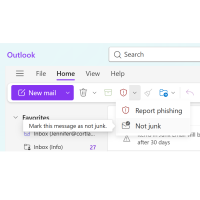
How to Mark an Email as Safe in OutlookOutlook on the Web (Outlook.com or Office 365)Open Outlook in your browser.Go to your Junk Email or Spam folder.Find and open the email you want to keep.At the top, you will see a Red Shield(Report) - click Not junk. If prompted, check Always trust emails from this sender. The email will move back to your Inbox and future emails from that sender should stay out of Junk.Outlook Desktop App (Windows)Open the Outlook app.Click the email you want to mark
 Wednesday, July 30, 2025
The Member Information Center A powerful member-only benefit (MIC)
The Member Information Center - A powerful member-only benefit The Member Information Center is a powerful member-only benefit right at members’ fingertips. This simple-to-use tool allows members greater control over their business and brand name.What is the Member Information Center? The Member Information Center (MIC) is an online password-protected community for Chamber members. Its clean layout provides a hub for daily interactions, allowing members to easily access resources and benefits while
